
Discover powerful plugins & skills. Create & Sell Your Own. Ship from GitHub.
Find plugins and skills to supercharge your workflow—or create and sell your own. Browse the marketplace or connect your GitHub repo and start monetizing today.
$ npm -g install bskillsUp and running in one command
Install the CLI and let the interactive setup do the rest. It detects every AI agent on your machine, configures the skill paths, and gets you ready to browse the marketplace.
$ npm -g install bskills
added 1 package in 2s
$ bskills init
✓ Detected Claude Code, Cursor, Windsurf
✓ Configured skill registry
✓ Linked 18 agents
Ready. Run `bskills search` to begin.
Loved by builders.
“Installed bskills, ran init, and every one of my agents had the same skills in under a minute. This is how it should have always worked.”
Numman Ali
@nummanali
“Finally a marketplace where I can publish a skill straight from my private GitHub repo and actually get paid for it.”
John Holloway
@jholloway
“The cross-agent sync alone is worth it. I switch between Cursor and Claude Code all day and never re-install anything.”
yash
@yashdev
“85% revenue split with automatic Stripe payouts. I shipped my first skill on a Friday and had sales by Monday.”
Mara Lin
@maracodes
“The curation makes the difference — every skill I've installed from BuySkills has just worked. No broken configs.”
Diego Romero
@diego_rmr
“One CLI for 18 agents. I stopped maintaining my own dotfiles repo of agent skills entirely.”
Priya Nair
@priyabuilds
“Installed bskills, ran init, and every one of my agents had the same skills in under a minute. This is how it should have always worked.”
Numman Ali
@nummanali
“Finally a marketplace where I can publish a skill straight from my private GitHub repo and actually get paid for it.”
John Holloway
@jholloway
“The cross-agent sync alone is worth it. I switch between Cursor and Claude Code all day and never re-install anything.”
yash
@yashdev
“85% revenue split with automatic Stripe payouts. I shipped my first skill on a Friday and had sales by Monday.”
Mara Lin
@maracodes
“The curation makes the difference — every skill I've installed from BuySkills has just worked. No broken configs.”
Diego Romero
@diego_rmr
“One CLI for 18 agents. I stopped maintaining my own dotfiles repo of agent skills entirely.”
Priya Nair
@priyabuilds
Skill up your agents, not your config files.
You install the CLI once — your agents handle discovery, install, and sync.
Install the CLI
Run a single command. The interactive setup detects every AI agent on your machine and wires up the skill paths for you.
$ npm -g install bskills
$ bskills init
Your agents browse for you
Ask Claude Code for a capability it’s missing. It searches the marketplace and installs the right skill itself — through the same CLI, on demand.
# Claude Code, on demand
$ bskills search "code review"
$ bskills install code-reviewer
Every agent stays in sync
Codex, Cursor, and 15+ other agents pick up the same skill from the shared registry — no second install, no manual config.
# Codex picks it up
$ bskills update
✓ synced across 18 agents
Everything you need to run skills.
One marketplace, one CLI, every agent. Discover, install, sync, and — if you build — sell.
One-Command Install
Install via `bskills install <skill>` or the visual dashboard. Skills land in a shared registry with agent-specific symlinks.
Cross-Agent Sync
Add a skill in Claude Code and it is instantly available in Cursor, Windsurf, Codex, and every other agent you use.
Curated Marketplace
Filter by category, search by keyword, or explore collections. Every plugin and skill is reviewed before it ships.
Visual Dashboard
Install, update, and remove skills with one click. No terminal required — a visual UI puts you in control.
GitHub-First Publishing
Your code stays in your private repo. Connect a URL, pick a category, set a price — and you are live.
Keep up to 95%
Get paid in USDC on Solana at a flat 5% fee — or take cards via Stripe (15% + $0.50). Automatic payouts, your choice of rails.
Bring your own agent.
Your Claude Code, Cursor, Codex, and Copilot — one shared skill registry, synced automatically. If it reads a skill directory, BuySkills supports it.
Publish from GitHub. Get paid.
Your code already lives on GitHub. Connect your repo, pick a category, set a price — we handle distribution, payments, and payouts.
Global Reach
Instantly reach thousands of AI agent users worldwide. No marketing budget required — we bring the customers to you.
Keep up to 95%
Get paid in USDC on Solana and keep 95% with a flat 5% fee — or accept cards via Stripe (15% + $0.50). No hidden fees either way.
Secure Payments
Automatic payouts, fraud protection, and transparent analytics. Get paid reliably every month.
Keep up to 95%. Get paid in USDC.
Settle in USDC on Solana with a flat 5% fee and keep 95% — or accept cards through Stripe. Either way your earnings are secure and payouts are automatic.
Bank-Level Security
All transactions are encrypted with TLS 1.3 and processed through Stripe's PCI DSS Level 1 certified infrastructure — the highest security standard in the industry.
Automatic Payouts
No manual invoicing required. Your earnings are automatically deposited to your bank account via Stripe Connect.
Transparent Fee Structure
Choose your rails: USDC on Solana at a flat 5% (keep 95%), or Stripe at 15% + $0.50. Use the calculator to see your exact earnings.
Global Payment Support
Accept payments from customers worldwide. Stripe handles currency conversion and international payment methods automatically.
Total Earnings
$14,358.96
from 642 sales · paid in USDC
Next Payout
Jul 1, 2026
via Solana
$14,358.96
See exactly where your money goes.
Use the calculator to see your exact earnings at any price point. No surprises, no hidden fees.
$1,899.05
95.0%
Complete Fee Breakdown
5% flat per sale
USDC on Solana · negligible network fee
95.0% of revenue
Flat 5% fee
Get paid in USDC on Solana. Flat 5% fee — you keep 95%, settled near-instantly.
Two ways to get paid: Solana settles in USDC at a flat 5% — you keep 95%. Prefer cards? Stripe is 15% + $0.50 per transaction and we cover Stripe's processing fees (2.9% - 5% + $0.30).
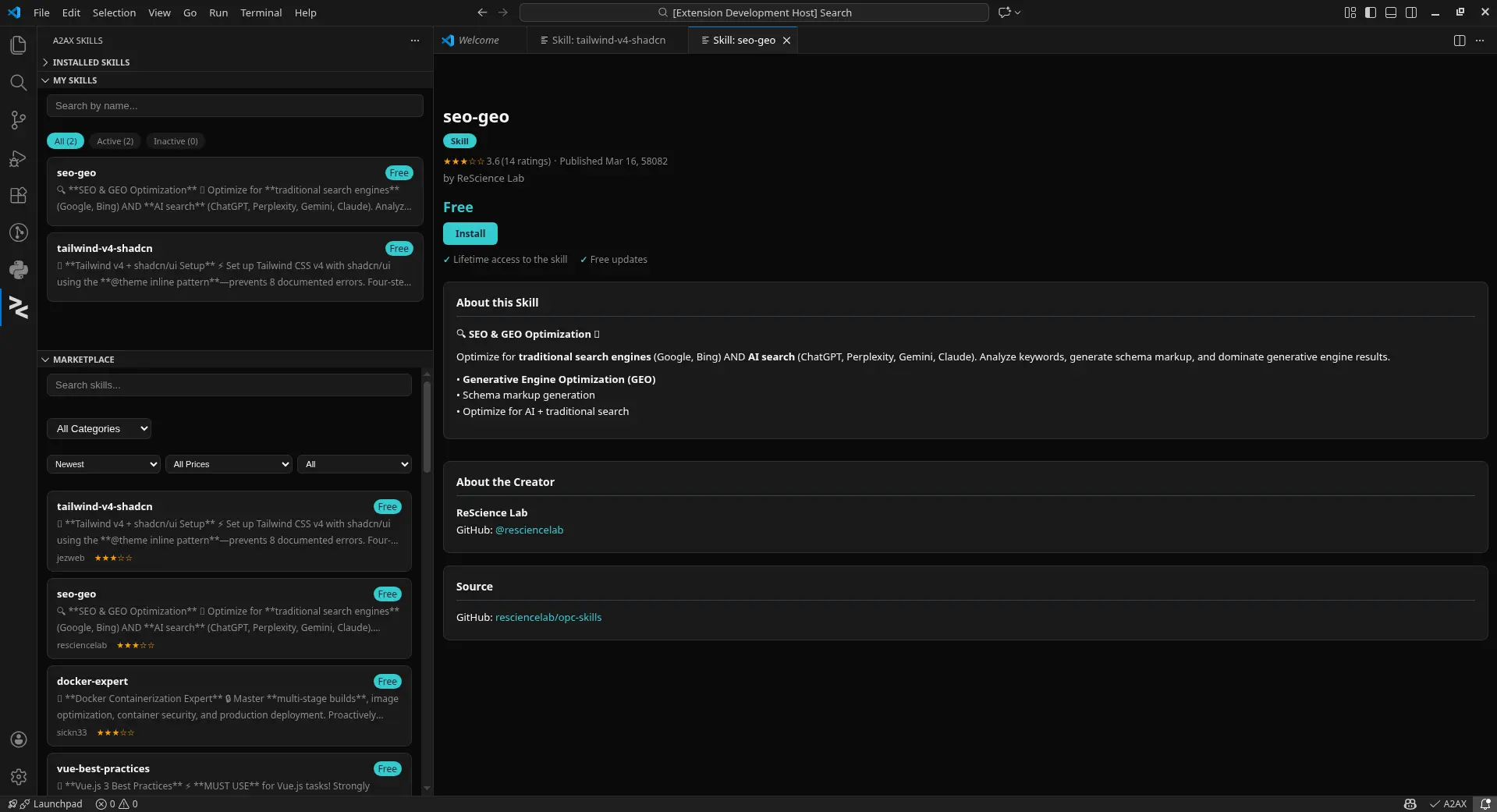
Browse & install skills from your editor.
Manage skills across 18+ agents directly inside VS Code. Search the marketplace, install with one click, and keep everything in sync — without leaving your editor.
Frequently asked questions.
How do I get started?
Run `npm -g install bskills` to install the CLI, then `bskills init`. The interactive setup detects the AI agents on your machine, configures the skill paths, and gets you ready to browse the marketplace — no account required to start.
Which AI agents does BuySkills support?
BuySkills works with 18+ agents including Claude Code, Cursor, GitHub Copilot, Windsurf, Codex, Gemini, Cline, Roo, and more. Install a skill once and it is synced across every agent you have configured.
How does cross-agent sync work?
Skills are stored in a single shared registry on your machine. BuySkills detects each installed agent and exposes the skill in that agent’s skill directory automatically via symlinks — so a skill bought once shows up everywhere without re-installing.
Are skills free or paid?
Both. The marketplace has free community skills and paid premium skills. Creators choose: share for free, or set a price and earn from every sale.
How much do creators earn?
Creators keep up to 85% of every sale. The platform fee is a transparent 15% + $0.50 per transaction, and Stripe processing fees are covered by us. Payouts are automatic and monthly.
Where does my code live when I publish?
In your own private GitHub repository. You connect a repo URL, pick a category, and set pricing — BuySkills never takes ownership of your source. Updates ship automatically when you push.
Do I need the terminal to use BuySkills?
No. The CLI is the fastest path, but a visual dashboard and a VS Code extension let you browse, install, update, and remove skills with one click — no terminal commands required.
Skill up every agent in one command.
Install the CLI, run init, and start browsing the marketplace. Free to start — no account required.
$ npm -g install bskills
$ bskills init